Free Fire Aim Tricks: How to Improve Aim and Hit More Headshots
Updated October 2026 for OB55. Applies to Free Fire and Free Fire MAX.
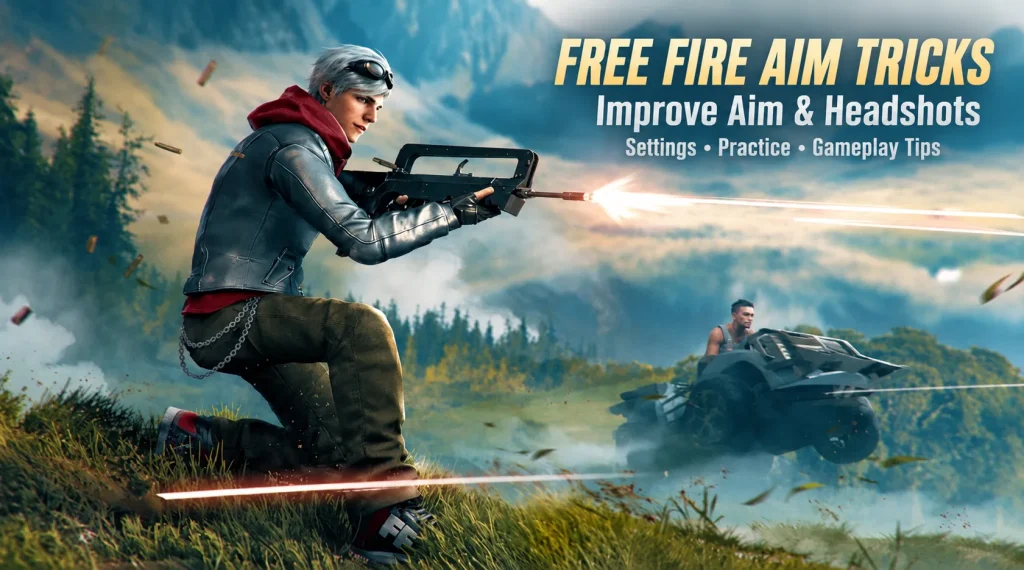
Most missed headshots come down to three things: your crosshair sits too low before the fight starts, your drag swipe is too long, or your sensitivity was copied from someone else’s phone. Fix them in that order before you touch anything fancy. And to be clear, no setting locks onto heads for you. Aim assist helps, but crosshair placement and a calm thumb do the real work.
This guide covers the settings worth changing, a short practice routine, fixes for the most common misses, and a 7-day plan. Garena’s latest patch notes (OB55, September 2026) focus on Naruto content, Clash Squad throwables, a Kenta rework and weapon balance, with four new weapons arriving on October 1. From the summary I checked, none of that changes how aiming works, but weapon feel shifts every season, so retest after big patches. The official notes are on the Free Fire site.
How to Improve Your Aim in Free Fire Quickly
Start here, before you spend an hour on sliders. These three habits cost nothing and fix most of what feels like “bad aim”.
Keep Your Crosshair at Head Level
Keep the crosshair at head height all the time, not only when you spot someone. If it sits at the chest or the floor, every fight opens with a long swipe upward, and that swipe is where most misses happen.
When you move through a building, look at where a head would appear in the next doorway or window and park the crosshair there. Around corners, aim at the edge where someone would step out. Standing players show their heads high, while a player crouched behind a low wall is lower, so adjust as you read the cover.
Example: you’re about to push through a door. Lift your view to roughly head height of a standing player before you step in. If somebody is inside, you only need a tiny correction instead of a full drag.
Learn Drag Aiming for Better Headshot Accuracy
A drag headshot means you start on the body and slide your thumb upward while firing, so the crosshair travels to the head and stops there. It works because the body is a bigger target to start on, and the upward motion finishes the job.
Do it slowly at first. Put the crosshair on the chest, press fire, and drag up in one short, smooth motion. Stop the thumb when the crosshair reaches the head. The common mistake is not direction, it’s distance. A swipe that’s too big sends the crosshair over the head and into empty air.
Keep the drag the same size every time. Repeatable beats fast, because you can only fix a swipe you can repeat.
Adjust Your Aim for Moving Enemies
Moving targets need tracking, not chasing. Follow their direction with a smooth camera movement, aim a little ahead of where they’re heading, and fire in short bursts instead of holding the trigger down.
Most players strafe, and many pause for a split second when they switch direction. Those pauses are your window. If you correct every tiny step they take, the crosshair shakes and you miss. Pick a spot on their upper body, stay with it, and lift to the head only once you’re settled.
Free Fire Perfect Headshot Aim Lock Sensitivity: How to Find the Right Settings
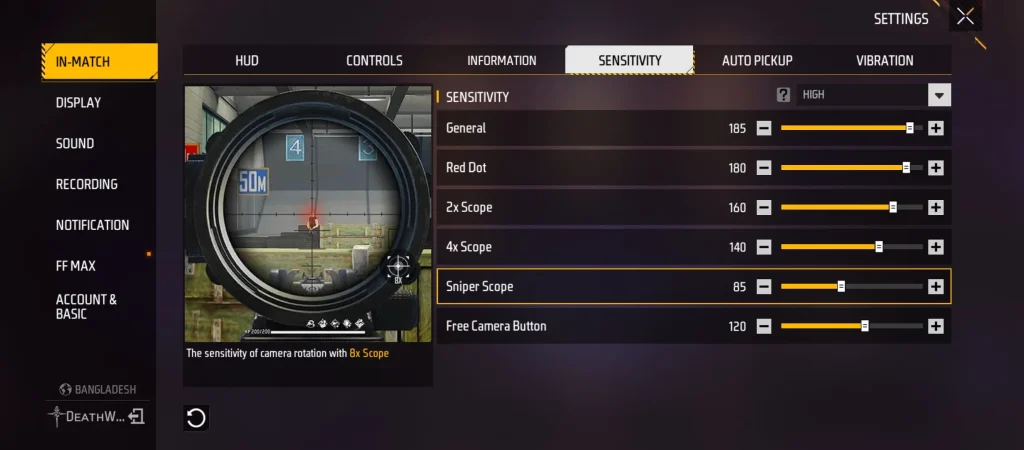
You’ll see “aim lock sensitivity” all over YouTube thumbnails, but there’s no slider that glues your crosshair to a head. What good sensitivity does is make your drag land where you meant it to.
One thing to check before you copy any numbers: which scale your game shows. A guide citing Garena’s April 2024 patch notes says the sensitivity cap was raised to 200, so many phones show 0 to 200, while older guides still use 0 to 100. Don’t just double an old number. The feel doesn’t scale that neatly, and the cap tells you the limit, not a recommended value.
How to Adjust General Sensitivity for Better Aim Control
General sensitivity controls how fast your camera turns when you’re not looking through a scope. Set it fast enough that you can turn to check a flank without three thumb swipes, and slow enough that small movements don’t jitter.
Change it in steps of 5 to 10, one slider at a time, then test in the Training Ground before you take it into ranked. If you change four things at once, you’ll never know which one helped.
How to Tune Red Dot and Scope Sensitivity
The rule is simple: more zoom, lower number. A small thumb movement at 4x moves the view much further than the same movement at hip fire, so scopes need gentler settings.
These are rough starting zones on the 0 to 200 scale. They overlap with what several community guides suggest, but they are not official, and the guides don’t fully agree with each other:
General: 150 to 190
Red Dot: 140 to 180
2x Scope: 130 to 170
4x Scope: 110 to 150
Sniper Scope: 70 to 110
Free Look: matters little for headshots, so leave it where it feels comfortable
Start in the middle of each range. If your crosshair overshoots in a scope, lower that slider by 5. If it feels heavy and slow, raise it by 5.
Sensitivity Settings for Low-End and High-End Devices
On a low-end phone (2 to 4 GB RAM, frame rate that drops in fights), touch delay makes aim feel heavy, so people lean toward the upper part of each range. The catch is that maxing every slider at 200 turns tiny finger movements into big jumps, and the crosshair skips right past the head. Fix lag first (see the troubleshooting section below), then raise sensitivity only as much as you need.
On a high-end phone with a 90 Hz or 120 Hz screen, touch response is quicker, so the lower half of each range usually gives you more control. Your phone, your screen size and your thumb all matter, which is also why a streamer’s numbers can feel wrong on your device.
DPI vs. In-Game Sensitivity: What Should You Change?
Change in-game sensitivity first. Free Fire has no DPI slider. DPI is an Android display setting that changes touch feel and interface size across the whole phone, not just this game. Treat it as a last step, and only touch it once your in-game numbers are stable and you’ve played with them for a while. Changing both at once makes it impossible to tell what fixed or broke your aim.
Free Fire Perfect Aim Guide: A 4-Step Practice Routine
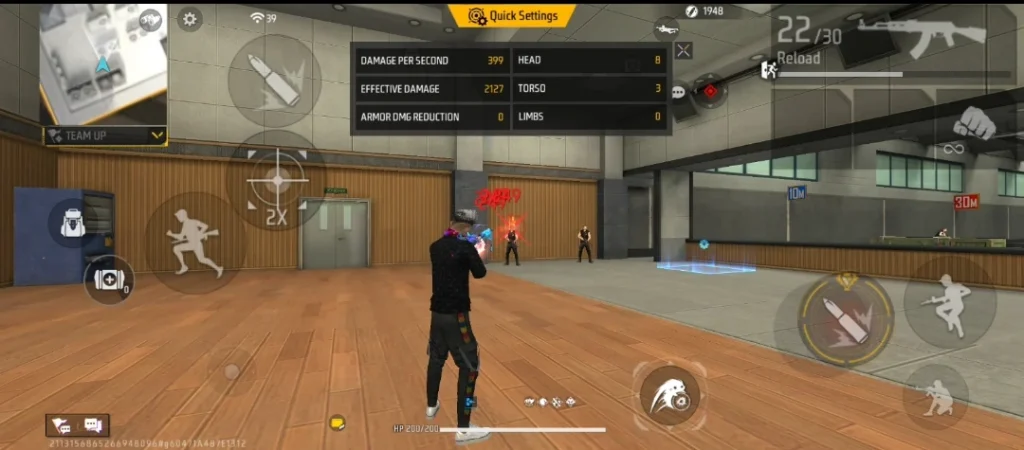
This takes about 20 minutes. Use the same one or two weapons you actually play, because aim practice with a gun you never use doesn’t carry over.
Step 1: Warm Up in the Training Ground
Spend 3 to 5 minutes moving, turning and opening your scope. You’re not trying to hit anything yet. You’re checking that your sensitivity feels the same as yesterday and that your thumbs are awake.
Step 2: Practice Aiming at Stationary Targets
Put the crosshair on a head, fire a short burst, and reset. Do ten bursts and count how many land on the head. Write the number down. This is your baseline, and it’s the only way to know later whether anything improved.
Step 3: Improve Tracking Against Moving Targets
Follow a moving target for a few seconds before you fire. Your goal is a smooth camera that stays on the upper body, not a camera that jumps. If the crosshair shakes, slow your thumb down before you blame the settings.
Step 4: Practice Drag Shots in Realistic Combat Scenarios
Training dummies don’t shoot back, so finish in a casual match or a mode where fights are quick and repeatable. Focus on one thing per match, for example “short drag, stop at the head”. Don’t try to fix movement, aim and positioning in the same game.
How to Fix Inconsistent Aim and Missed Headshots
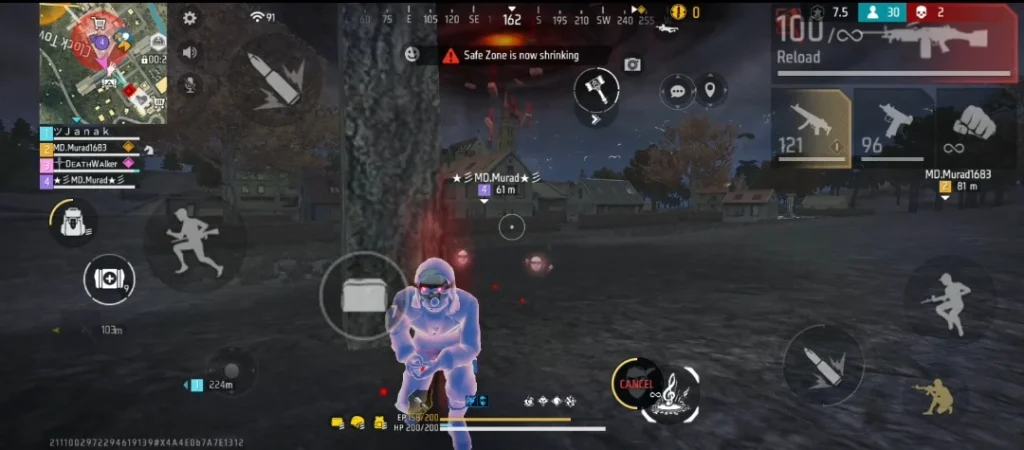
When aim feels random, it usually isn’t. Each miss below has a cause you can fix.
How to Fix Overshooting During Drag Aiming
Problem: the crosshair flies above the head. Why it happens: the swipe is too long, or that scope’s sensitivity is too high. Fix: shorten the drag to a small thumb movement, lower the matching slider by 5, and let the swipe finish before you judge the shot. Example: if you miss over the head with a 4x scope but not with a red dot, only the 4x slider needs to come down.
How to Correct Crosshair Placement Before Firing
Problem: shots land on the chest or legs. Why it happens: you start correcting after you see the enemy. Fix: pre-aim at head height, and make your correction before you press fire, not during it. A half-second pause to line up usually costs less than spraying a magazine into the body.
How to Improve Accuracy While Moving
Problem: you hit while standing and miss while running. Why it happens: moving makes it harder to keep a steady camera, and weapons kick as you fire. Fix: slow down or stop for your first shots, strafe between bursts instead of during them, and use short bursts so recoil doesn’t drag the crosshair off the target. Long sprays at range climb away from the head, so re-center after every burst. Test this in the Training Ground with your own gun, since each weapon feels different.
How to Troubleshoot Lag and Unresponsive Controls
Problem: your swipes feel delayed or skip. Why it happens: low frame rate, weak connection, or a phone that’s struggling. Fix, in this order:
- Check your ping and switch between Wi-Fi and mobile data to see which is steadier.
- Close background apps and turn off battery saver.
- Lower graphics so the frame rate stays stable.
- Clean the screen, dry your hands, and check that a thick screen protector isn’t dulling touch.
- Update the game and restart your phone, especially if the problem started after a patch.
Also, stay away from apps or APKs that promise auto headshots. They break Garena’s rules and put your account at risk.
Free Fire Aim Precision Settings: Which Option Should You Choose?
Aim Precision is Free Fire’s aim assist control, found in Settings under the controls options. Pick one, play with it for a few matches, and don’t flip it back and forth mid-session.
Understand Default Aim Precision
Default keeps aim assist on, which gives you a bit of help pulling the crosshair toward enemies. It’s the sensible choice while you’re still learning crosshair placement and drag. Full Control is the other end: it turns aim assist off completely, so every bit of aim is yours.
When to Use Precise on Scope
Precise on Scope sits between the two. Older guides disagree on exactly which situations it switches assist on or off for, so check how it behaves on your own device instead of trusting any single description. Consider it once your placement is decent and you notice assist tugging you off the enemy you meant to hit, for example in fights with more than one player on screen.
How to Compare Aim Precision Settings in Practice
Run a simple test. Use the same weapon and the same practice routine for 10 minutes on each setting. Count your headshots out of ten bursts, like in Step 2, and note how the camera feels in scopes. Keep whichever setting gives you the better number and the calmer feel. If they come out close, stay with the one you’re more comfortable with.
How to Practice Free Fire Aim for 7 Days
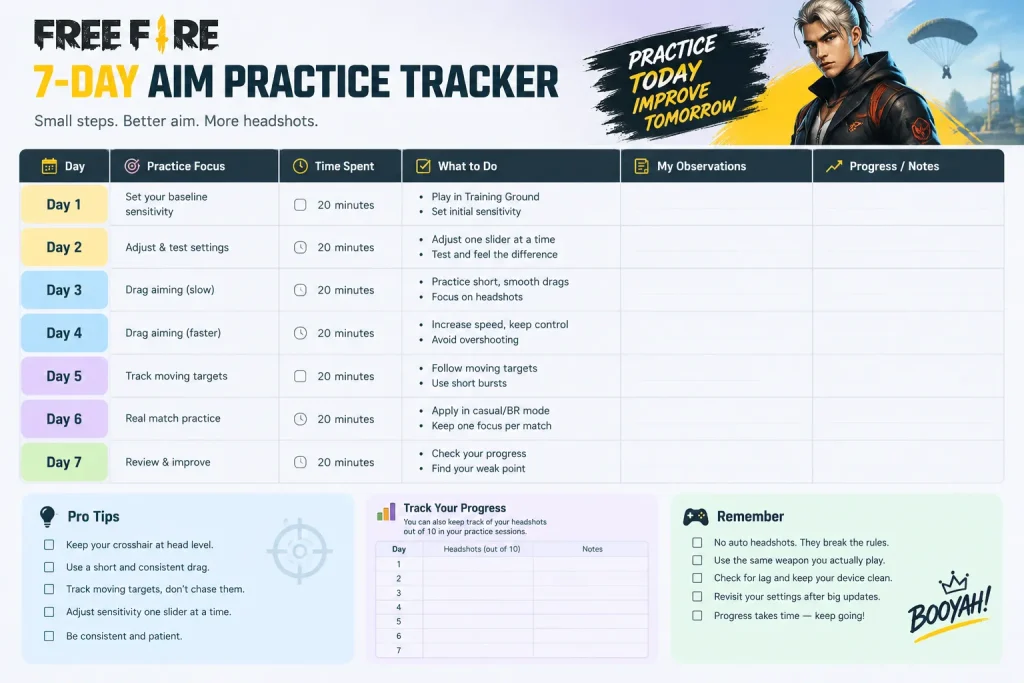
Twenty focused minutes a day beats one long session on Sunday. Keep a note of your numbers each day.
Days 1–2: Establish Your Baseline Sensitivity
Pick a starting point from the ranges above, run the practice routine, and record your headshots out of ten. Adjust one slider at a time by 5. Stop changing things once the camera feels controllable.
Days 3–4: Practice Controlled Drag Aiming
Focus only on the swipe. Short, repeatable drags from the chest to the head. If you overshoot, shorten the drag before you touch any slider.
Days 5–6: Train Against Moving Targets
Work on tracking and short bursts. Aim a bit ahead, stay smooth, and fire when the target slows or changes direction.
Day 7: Review Your Accuracy and Identify Weaknesses
Compare today’s number with day 1. Then find the one habit that cost you the most: overshooting, low crosshair, shaky tracking or lag. Make that your focus for the next week.
Frequently Asked Questions About Free Fire Aim Tricks
How Can I Improve My Aim in Free Fire?
Keep your crosshair at head height, use short and repeatable drags, and set sensitivity that fits your own phone. Then practice for 20 minutes a day and track your headshots out of ten so you can see progress.
What Sensitivity Is Best for Headshots in Free Fire?
There isn’t one number that works for everyone, because it depends on your phone, screen refresh rate and thumb size. Check whether your game shows a 0 to 200 or 0 to 100 scale, start in the middle of the zones above, lower the scope sliders as zoom increases, and change one slider at a time.
How Do I Improve Drag Headshots?
Start on the chest, press fire and drag up in one short motion, then stop when the crosshair reaches the head. Practice slowly until the drag is the same size every time, then speed it up.
Can Aim Lock Sensitivity Guarantee Headshots?
No. Sensitivity changes how far the crosshair moves for each swipe, but it can’t aim for you. Headshots still depend on crosshair placement, a clean drag and a stable connection.
Why Does My Aim Keep Going Above the Enemy’s Head?
Usually your drag is too long or that scope’s sensitivity is too high. Shorten the swipe, lower the slider by 5, and make sure the crosshair isn’t already sitting too high before you drag.
Next step:
open the Training Ground tonight, record your baseline headshots out of ten, and change only one thing before your next match.